Time Sync v2.0.2
** Updated November 9, 2008
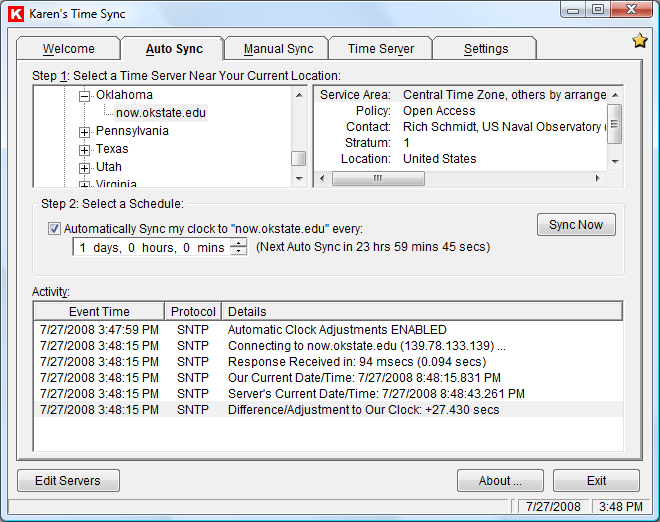
Stay on time! Now you can synchronize your computer's clock to one of the many ultra-precise time servers available on the Internet. You can schedule periodic automatic updates, or adjust your clock on demand any time you choose.
For more information, read these issues of Karen's Power Tools newsletter:
 |
• July 29, 2004 | |
• September 21, 2004 |
|
• December 16, 2004 | |
• March 17, 2010 |
Download
 |
|
Download Karen's Time Sync | | SHA-1 |
|
|
Download and run to install Karen's Time Sync | |
1,382,472 bytes |
|
||||
|
|
Download VB6 Source Code | | SHA-1 |
|
|
Programmers only | |
257,400 bytes |
|
||||
|
|
Download Visual Basic Runtime v6.0 | | SHA-1 |
|
|
Note: Karen's Time Sync's installer will automatically download and run the Visual Basic Runtime installer, if necessary. | |
1 MB |
Enhancements/Bugs Fixed
- Version 2.0.2: Caused program to wait 3 seconds (to allow network connection to be established) before automatically synching computer's clock when my Time Sync program starts. Program will now run as Administrator when run under Windows Vista (so it will have permission to adjust computer clock). Also made minor cosmetic changes to Edit Time Servers window.
- Version 2.0.1: Fixed bug that could cause the program to fail to load under certain circumstances.
- Version 2.0.0: Added ability to act as a "time server", providing time-of-day to other computers.
- Version 1.1.3: Fixed bug in window resizing routine that prevented resizing window immediately after changing window's resizable setting.
- Version 1.1.2: Fixed bug that prevented program from automatically exiting when asked to sync clock then exit when Windows starts.
- Version 1.1: Added option to show icon in system tray when miminized, option to sych them immediately exit when launched. Program will now create shortcut in Windows' Startup folder when asked to launch automatically when Windows starts. Corrected country of two time servers (incorrectly placed in Zaire, instead of South Africa). Fixed bug that prevented Auto-sync on startup from working if scheduled auto-sync not enabled.
- Version 1.0: This is the first release


More than 6000 downloads monthly
Received $47.28 this month* — Thanks!
License for Work
A license is required to use any or all of these tools for your work. You only need one per lifetime. If you make money with Karen's software, read her license agreement.
Power Tools Newsletter
- New Powertool Released, Directory Printer Lite
- Back on Facebook
22541 Subscribers!
Subscribe to receive new issues of the newsletter about Karen and her free Power Tools.
Click here to SubscribeOctober Revenue* $47.28
*Licenses + Donations - PayPal Fees
Sep $123 Aug $283 Jul $121 Jun $108 May $179 Apr $197 Mar $299 Feb $94 Jan $133 (2025 $2889 Total Thank you!) Dec $128 Nov $119 Oct $169 Sep $215 Aug $206 Jul $662 Jun $340 May $135 Apr $195 Mar $140 Feb $257 Jan $321 (2024) $3191 (2023) $3877 (2022) $9500 (2021) $6210 (2020) $9710 (2019) $13,377 (2018) $2,836 — Thanks again!