Show Stopper v2.1.3
** Updated August 16, 2007
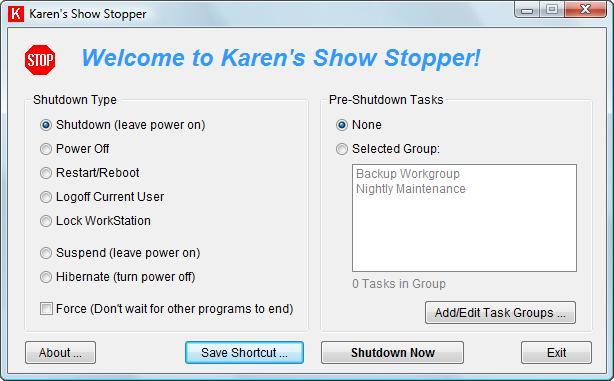
Shutdown, Power Off, Reboot, Log Off, Suspend or Hibernate -- all from a desktop shortcut or command line!
Karen's Show Stopper allows you to create shortcut icons that quickly Shutdown, Power Off, Reboot, Log Off, Suspend or Hibernate your computer. You can also run the program as a small icon in Windows System Tray, and shutdown Windows by right-clicking on this icon.
Another option allows you to shutdown Windows from the Show Stopper's main window. You can even run the Show Stopper from a command line, and specify your type of shutdown via command-line parameters!
And now, you can specify one or more tasks (programs) to be run automatically just before your computer is shutdown, powered off, logged off, etc.!
For more information, read these back issues of Karen's Power Tools newsletter:
- December 18, 2002
- January 28, 2003
- March 11, 2003
- March 18, 2003
- April 17, 2003
- April 29, 2003
- July 1, 2003
- July 9, 2003
 |
||
|
||
|
||
|
Download
 |
|
Download Karen's Show Stopper | | SHA-1 |
|
|
Download and run to install the Show Stopper | |
784,544 bytes |
|
||||
|
|
Download VB6 Source Code | | SHA-1 |
|
|
Programmers only | |
159,920 bytes |
|
||||
|
|
Download Visual Basic Runtime v6.0 | | SHA-1 |
|
|
Note: Karen's Show Stopper's installer will automatically download and run the Visual Basic Runtime installer, if necessary. | |
1 MB |
Enhancements/Bugs Fixed
- Version 2.1.3: Changed location of settings files to better accomodate Windows Vista's security features. Also updated installer, made some cosmetic changes to user interface.
- Version 2.0.3: Inadvertently fixed a bug that sometimes prevented the program from initiating a hibernation.
- Version 2.0: Can automatically run groups of tasks (programs), immediately before a shutdown, power off, logoff, etc.
- Version 1.1: Disables options not available, when run on older versions of Windows. Also corrects problem that prevented forced logoffs when running Windows 95.
- Version 1.0.2: This is the first release.


More than 6000 downloads monthly
Received $71.70 this month* — Thanks!
License for Work
A license is required to use any or all of these tools for your work. You only need one per lifetime. If you make money with Karen's software, read her license agreement.
Power Tools Newsletter
- New Powertool Released, Directory Printer Lite
- Back on Facebook
22541 Subscribers!
Subscribe to receive new issues of the newsletter about Karen and her free Power Tools.
Click here to SubscribeSeptember Revenue* $71.70
*Licenses + Donations - PayPal Fees
Aug $283 Jul $121 Jun $108 May $179 Apr $197 Mar $299 Feb $94 Jan $133 (2025 $2889 Total Thank you!) Dec $128 Nov $119 Oct $169 Sep $215 Aug $206 Jul $662 Jun $340 May $135 Apr $195 Mar $140 Feb $257 Jan $321 (2024) $3191 (2023) $3877 (2022) $9500 (2021) $6210 (2020) $9710 (2019) $13,377 (2018) $2,836 — Thanks again!